MyChest

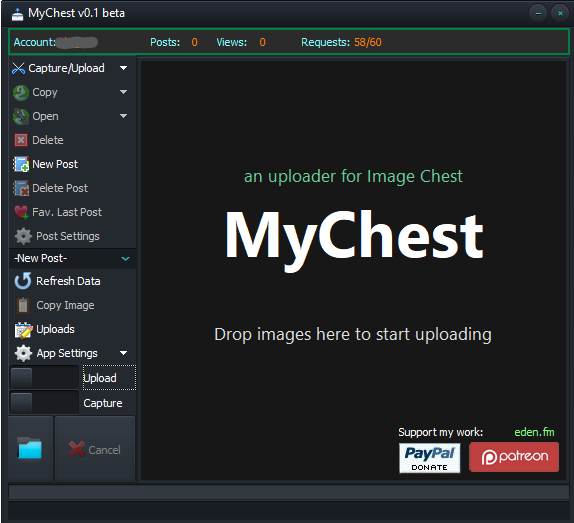
MyChest is a fast, lightweight capture and uploader tool for Windows, designed to make sharing screenshots and files with Image Chest as effortless as possible.

Capture an area of your screen, grab a specific window, paste an image from your clipboard, or simply drag files onto MyChest. With intuitive one-click actions and smart defaults, your images can be uploaded to Image Chest in seconds — individually or in batches, with no unnecessary steps.

MyChest is also the only desktop application with full Image Chest account integration, giving you direct access to your Image Chest posts and account features from your Windows desktop.

Features

  • Full Image Chest account integration — upload to a selected post, create or delete posts, favorite your latest upload, and more.
  • Wide format support — JPG, BMP, PNG, GIF, WebP, DDS, MP4, and more.
  • Windows Explorer integration — right-click an image and choose Send to Image Chest.
  • Batch uploads — drag multiple files onto MyChest and they are automatically queued and uploaded.
  • Smart image optimization — automatically adjust image quality or dimensions to reduce file size and speed up uploads.
  • Live screen capture — select and crop any area of your screen.
  • High-quality PNG captures — capture your screen without compromising image quality.
  • DirectX surface capture — capture content rendered directly through DirectX.
  • Live window selection — select specific windows using live thumbnails.
  • Clipboard support — paste images directly from the Windows clipboard.
  • Global hotkeys — quickly access all major capture and upload functions from the keyboard.
  • Upload history — keep a complete log of your uploads, including their online deletion URLs.
  • Flexible capture modes — capture to disk, upload existing files, capture and upload simultaneously, or capture directly to the clipboard.
  • Copy last image — instantly copy your most recent capture back to the clipboard.
  • Native x64 application — no .NET Framework required.
  • Portable version — run MyChest without installation.

API Limits

See the Image Chest API limits for current restrictions and quotas.
Disclaimer: The Image Chest name and logo are trademarks of Image Chest LLC and are used here for informational purposes only. MyChest is an independent, unofficial application and is not affiliated with, endorsed by, sponsored by, or officially approved by Image Chest.

↑